How to Get Free Product Samples From Amazon Creator Connections Campaigns
A practical guide for creators who find an interesting Amazon Creator Connections campaign and want to contact the brand, request a sample, and turn the opportunity into better-performing affiliate content.
Why This Matters
Many creators discover a promising offer inside Amazon Creator Connections and stop at one question: should I just accept the campaign, or should I ask the brand for a sample first?
The answer depends on your publishing model.
If you run a deals site, coupon page, or lightweight affiliate page and do not need original product footage, you can often skip the sample request, accept the campaign, and generate your campaign-specific link right away.
If you want to publish higher-conviction content such as demo videos, comparison clips, unboxings, storefront videos, or short-form product explainers, a free sample can make a real difference. It gives you original footage, stronger proof, and more credible publishing assets.
This article explains how to do that inside Amazon Creator Connections without sounding spammy or robotic.
Section 1: Contact the Brand Inside Creator Connections
Start by finding an affiliate campaign you actually want to promote inside Amazon Creator Connections.
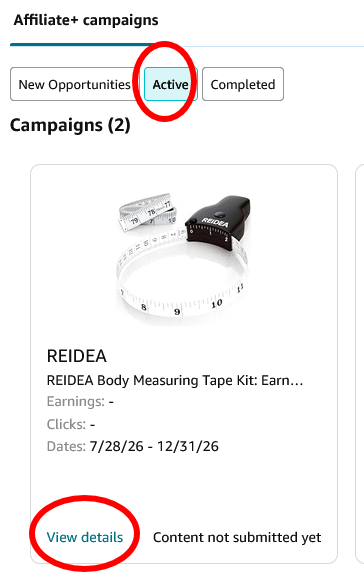
Step 1: Open the campaign details
Inside Amazon Creator Connections, find the campaign and click View Details.
This is the point where you should decide whether the campaign is a direct-link opportunity or a sample-first opportunity.
Step 2: Click Message Brand
Inside the campaign detail page, click Message Brand to start a conversation.
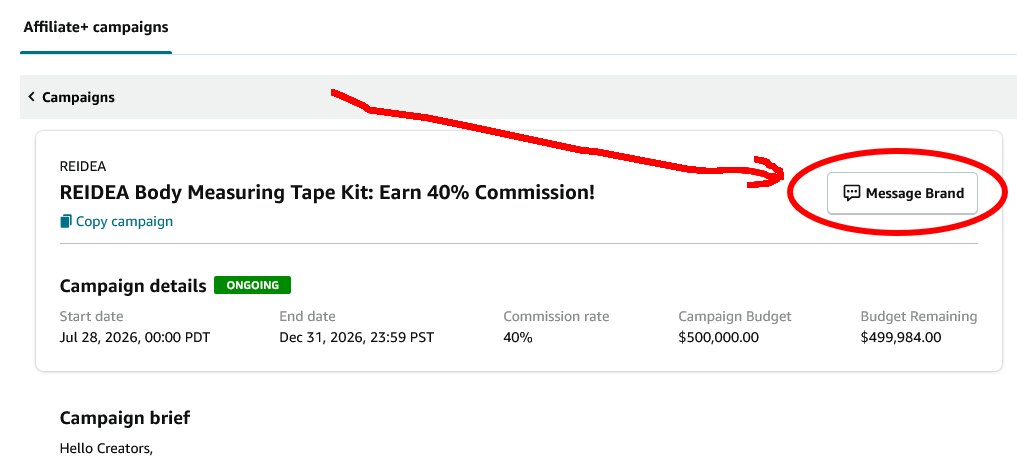
That is the cleanest way to request a sample because the brand can immediately see you are looking at their campaign from inside the Creator Connections workflow.
Important exception: when you do not need a sample
If you plan to promote the campaign without a sample such as through a deals website, a newsletter placement, a price-drop channel, or another format that does not require original product footage, you do not need to contact the brand first.
In that case, you can simply:
- Accept the campaign
- Open the campaign detail page
- Click Get Associate Link
- Use that campaign-specific link in your content
For the full link-generation workflow, read our earlier guide: How to Join the REIDEA Amazon Creator Connections Campaign and Turn It Into an AI Monetization Play.
Section 2: Outreach Messaging That Actually Helps
When you message a brand, the goal is not to sound clever. The goal is to make it easy for the brand to say yes.
Most brands are dealing with many creator messages. If they have hundreds of inbound requests, they will usually prioritize the ones that look real, specific, and easy to fulfill.
Your message should include three things.
1. Introduce your Amazon storefront or social profile
Always introduce your Amazon Influencer storefront or your most relevant social profile.
Use your real name. That matters more than people think. A real name makes you look like an actual creator instead of an automated outreach account.
If possible, briefly mention:
- your storefront link
- your content format
- how often you publish
- how many relevant product videos or creator assets you already have
2. Mention the exact product you want
Do not ask for “a sample” in vague terms.
Instead, mention the exact product and, ideally, the ASIN. This reduces back-and-forth and tells the brand you already know what you want to feature.
3. Include your shipping address
This is a surprisingly important detail.
If a brand is sorting through hundreds of requests, they are much more likely to send a sample quickly to creators who already included a shipping address. It removes friction and gives the brand a path to immediate fulfillment.
Sample message template
Below is a practical example based on the structure that tends to work well:
Hello, My name is Sunny Saylor, and I’m an active Amazon Influencer creating daily video content for my storefront. I would love to feature your ASIN B0GXXXXX in high-quality video content to help drive customer awareness and sales. I currently have over 300 published Amazon Influencer videos and post consistently. My videos focus on demonstrating product features, real-life use, and helping customers make confident purchasing decisions.
My storefront is: https://www.amazon.com/shop/xxxxxx
I would be excited to create content for your product and participate in your Creator Connections campaign. Would you be able to send me a sample of https://www.amazon.com/dp/B0xxxxx My address is 1414xxxxx. Thank you for your consideration!
You do not need to copy that word for word. The important elements are:
- real identity
- real creator surface
- exact ASIN or product link
- direct sample request
- shipping address
Section 3: Submit Your Published Links Back to the Campaign
If the brand sends you a sample and you publish the content, do not stop there.
You should submit the links to your published posts inside the Campaign detail page.
That matters for two reasons:
- It helps the brand see that you actually delivered
- You can review more detailed campaign-level earnings data inside the same detail view
That makes Creator Connections more useful than a loose email arrangement. The campaign detail page becomes both the communication layer and the reporting layer.
If you are building an affiliate workflow seriously, this reporting step is part of the monetization system, not an afterthought.
Section 4: How to Find Your Old Creator Connections Chats
If you have already contacted a brand and want to reopen the conversation later, here is the cleanest way to find the chat history.
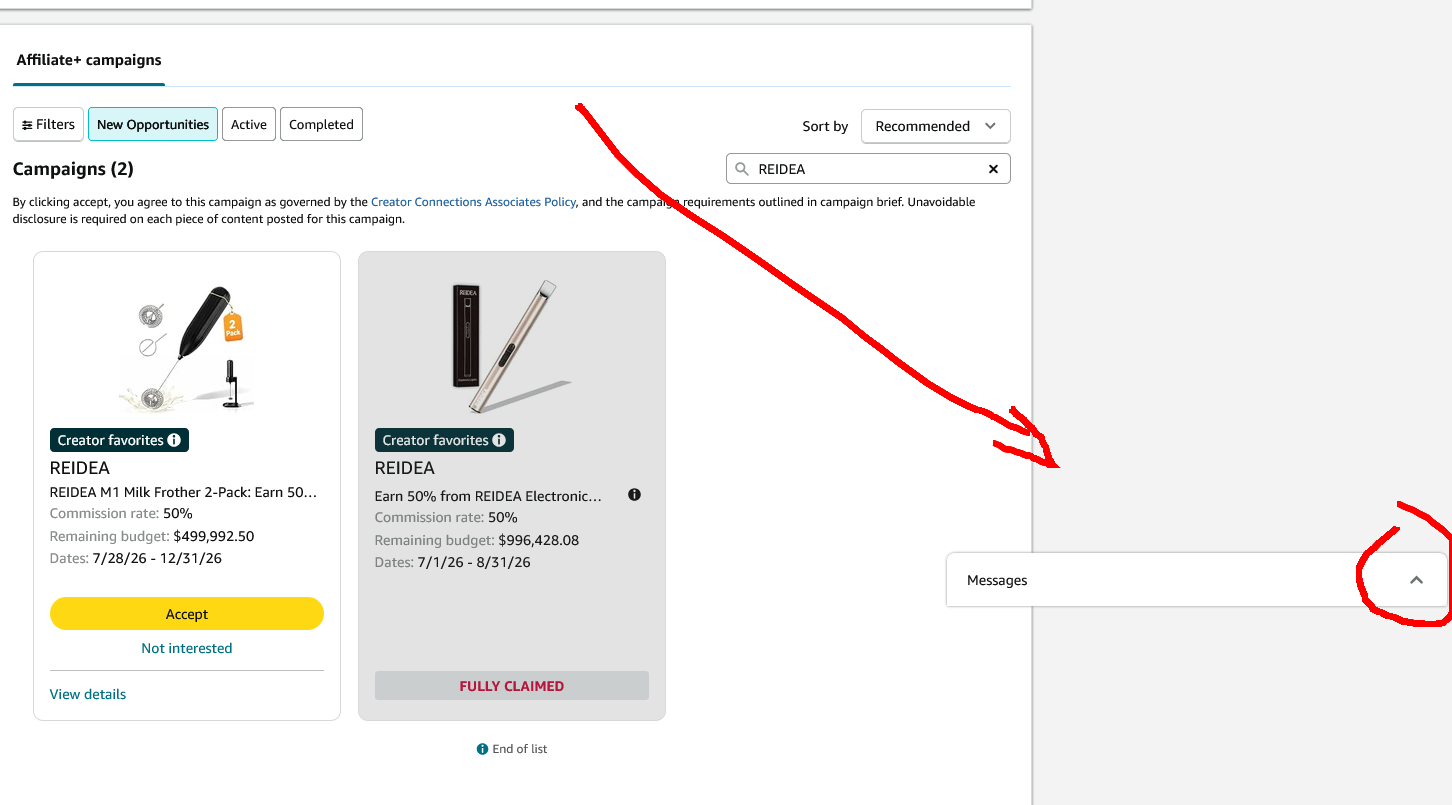
Step 1: Open the Creator Connections requests page
Go to:
https://affiliate-program.amazon.com/p/connect/requests
At the bottom-right corner, you will see a collapsed Message floating icon. Click it to expand the chat panel.
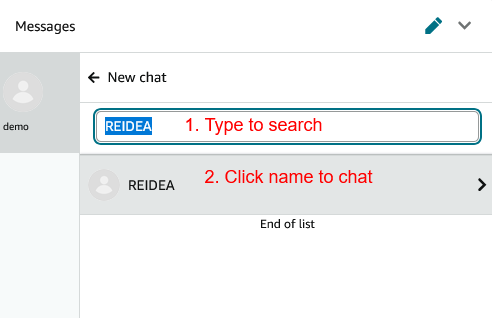
Step 2: Search for the brand or product
Inside the chat box, search for the brand name or product. Then click the brand name to reopen the conversation.
This is useful when:
- you want to follow up after no reply
- you want to confirm shipping details
- you want to send published post links
- you want to restart a conversation for a future campaign
Final Advice: Make It Easy to Say Yes
The easiest way to improve your odds of getting a free sample is not to write a longer message. It is to remove friction.
That means:
- use your real name
- show your storefront or creator profile
- specify the exact product or ASIN
- include your shipping address
- explain what kind of content you plan to create
Brands do not just want exposure. They want creators who look real, prepared, and easy to work with.
Related Reading
- How to Join the REIDEA Amazon Creator Connections Campaign and Turn It Into an AI Monetization Play
- How Beginner Influencers Can Get Free Product Samples From Brands
- AI Affiliate Workflow: From Campaign Acceptance to Commission Tracking
Prefer an offline copy? Download this article as PDF .